Get a Free SEO Audit or Automation Assessment

Run Claude Code and Codex in Parallel with Git Worktrees
Parallel coding agents are useful when you have independent work to do and a clear way to review it. CodeWrench brings the sessions, branches, task board and review tools into one free AI coding workspace.
The same approach works with other supported coding CLIs. Connect your own providers: CodeWrench is free, while your AI subscriptions and API usage follow the providers’ pricing.
A Practical Parallel-Agent Workflow
01
Start with a Small Git Project
Download CodeWrench, configure the coding tools you want to use, and add a repository with at least one commit. Begin with a small change you can review, such as a welcome page or a form validation fix.
02
Split the Work into Independent Tasks
Choose tasks that can proceed separately: a page component and its tests, for example. Two agents making the same architectural change still need coordination, even when their files live in separate worktrees.
03
Open Code and Launch Team
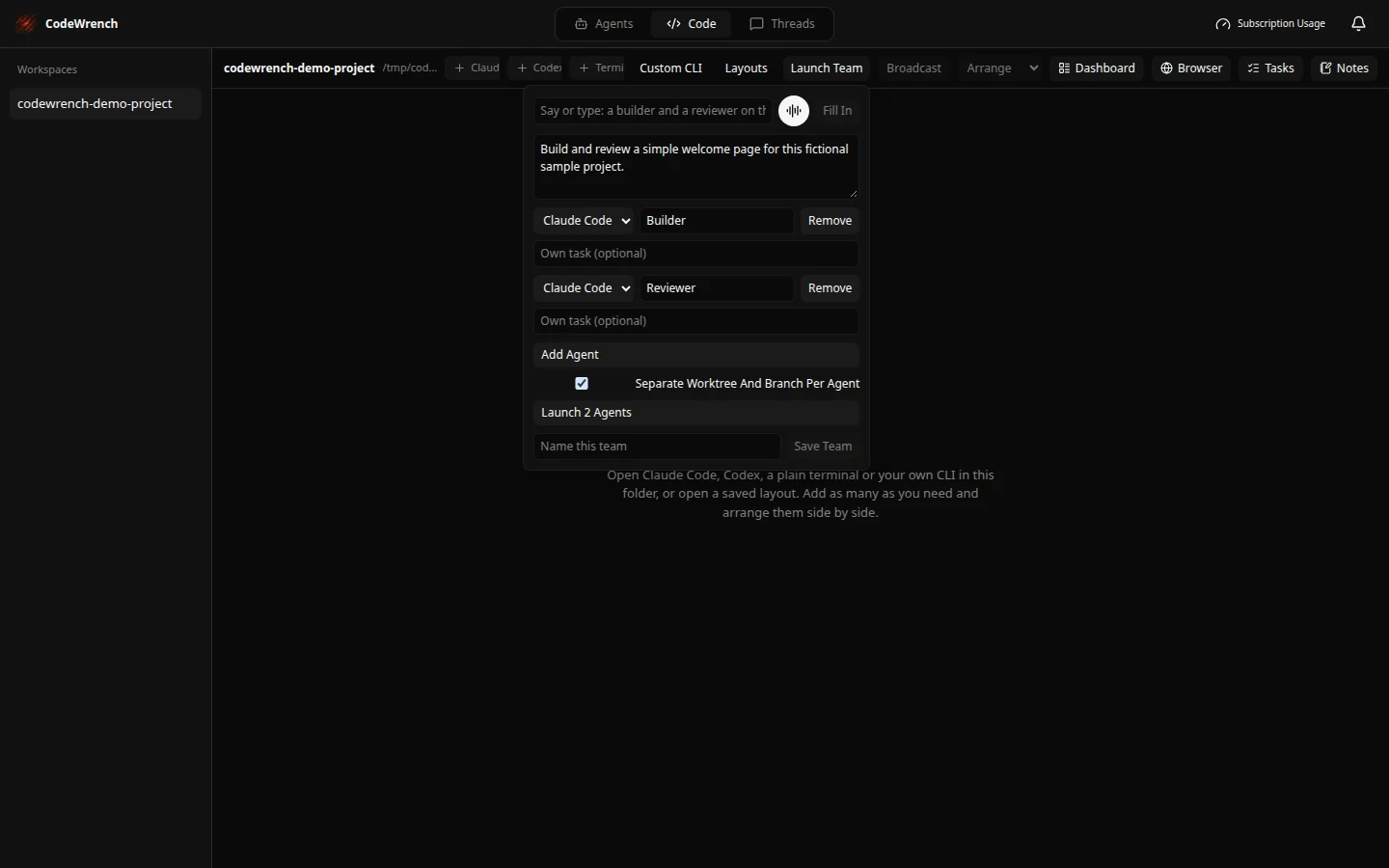
Select your workspace in the Code tab and open Launch Team. Choose a supported CLI for each pane, set roles such as Builder and Reviewer, and write the shared task. Use an individual task when one role needs different instructions.
04
Choose a Worktree and Branch Per Agent
Enable Separate Worktree And Branch Per Agent before launching. Each agent gets an isolated checkout and branch. Worktrees separate file edits; they do not resolve conflicting design choices or merge conflicts for you.
05
Follow the Sessions and Review Each Change
Use session status and the workspace Tasks board to see where attention is needed. Review each branch’s diff, run the relevant checks and inspect the browser preview. A reviewer on another worktree needs the builder’s branch or diff to review that work.
06
Integrate the Changes You Have Reviewed
Commit and merge changes in the order their dependencies require. Review the combined result, then open a pull request through the source control workflow. Keep worktrees with unfinished changes until you are ready to integrate or remove them.
Try This First Task
“Build a welcome page for this sample project. Keep the scope small, explain the changes, and identify the checks needed before we merge.”
Give the reviewer the resulting branch or diff and ask them to check the wording, keyboard navigation and test coverage. Start with two agents, then add more when the tasks are clearly independent.
What You Need Before Starting
A compatible CodeWrench installation, Git, a repository with a commit, and configured coding CLIs. The current published preview installer is for macOS on Apple silicon. Remote work needs a running, reachable host. Twelve terminal panes and six team-launch agents are per-workspace limits in the current Code tab, not a promise of unlimited AI usage.