
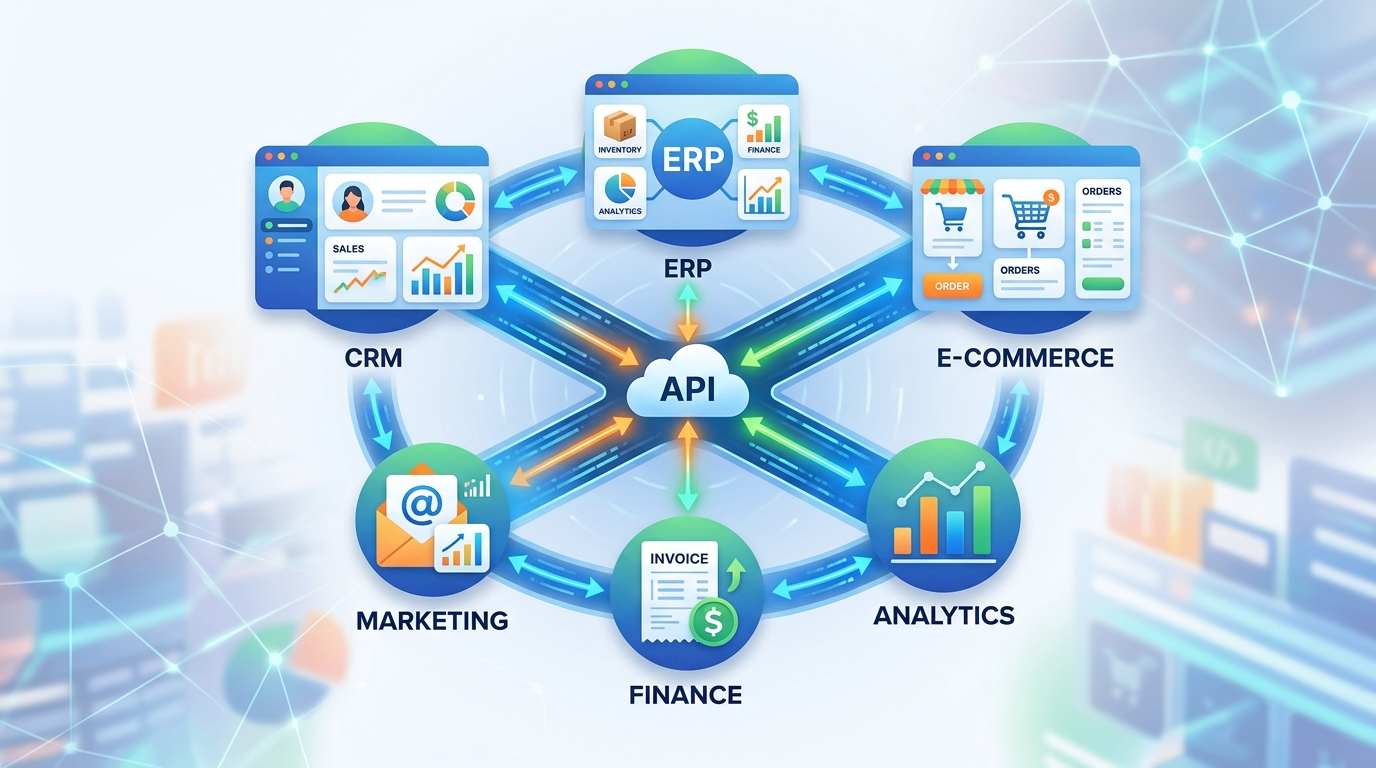
API integration is no longer a technical luxury—it’s the backbone of modern operational efficiency. When your CRM talks to your ERP, your e-commerce platform syncs with inventory and shipping APIs in real time, and your sales calls auto-populate your CRM via AI-powered software integration, you’re not just automating tasks—you’re future-proofing your business. In this comprehensive guide, we’ll demystify API integration, explore how it powers business tool integration across industries, and show you exactly how to implement it with purpose, reliability, and measurable ROI.
What Is API Integration? (And Why It’s Non-Negotiable in 2024)
An API (Application Programming Interface) is a set of rules and protocols that lets different software applications communicate. API integration, then, is the process of connecting two or more applications so they can exchange data and trigger actions automatically—without human intervention.
Think of it like a universal translator for your tech stack. Your marketing automation tool doesn’t “speak” your billing software’s language—until you introduce an API integration layer that interprets, validates, and routes data between them.
Unlike legacy point-to-point integrations (which break easily and scale poorly), modern API integration uses secure, standardized protocols—REST, GraphQL, and Webhooks—paired with middleware or iPaaS (integration Platform-as-a-Service) solutions to ensure reliability, auditability, and adaptability.
And the business impact? Significant:
- 68% of high-performing companies cite API integration as critical to cross-functional alignment (McKinsey, 2023)
- Businesses that implement 3+ strategic API integrations reduce manual data entry by 73% on average
- API-driven workflows shorten lead-to-close cycles by up to 41% (Salesforce State of Sales Report)
- When a new lead enters your CRM, does it immediately trigger a personalized email sequence, assign a territory-based rep, and log a task in Slack—all while updating lead scoring in real time?
- When inventory dips below threshold in your ERP, does your e-commerce platform automatically disable “Add to Cart,” notify procurement, and adjust ad spend on Google Shopping?
- Their SAP ERP (for live inventory levels and cost-of-goods data)
- FedEx and USPS carrier APIs (for dynamic rate calculation, label generation, and tracking sync)
- Google Merchant Center (via structured data + automated feed updates)
- Zoom Webhook + Twilio API captured inbound/outbound call metadata
- Custom Python NLP pipeline (hosted on Google Cloud) transcribed, scored sentiment, and extracted action items
- HubSpot API auto-updated lead status, custom fields, and activity timelines
- Slack API posted real-time alerts for high-intent leads (“Lead ‘Acme Corp’ just asked about enterprise pricing—follow up within 5 min!”)
- Built encrypted, FHIR-compliant ETL pipelines using AWS Step Functions & Lambda
- Designed a unified middleware layer (Node.js + PostgreSQL) acting as the single source of truth for patient, provider, and billing events
- Connected all systems via authenticated REST APIs with OAuth 2.0, field-level encryption, and automated consent sync
- Implemented role-based API access controls and real-time anomaly detection
- Stakeholder interviews (sales, ops, IT, compliance)
- Full system mapping—identifying data ownership, latency tolerance, and failure impact
- Technical debt assessment (legacy APIs, undocumented endpoints, auth fragility)
- Co-definition of success metrics—e.g., “Reduce manual CRM updates by 90% within 30 days,” not “Connect HubSpot to Slack”
- We define idempotency rules, error thresholds, and SLA requirements
- Build contract-first OpenAPI specs for all endpoints
- Map data transformations with strict validation rules (e.g., “If ERP status = ‘Shipped’, CRM status must update within 90 seconds or trigger PagerDuty alert”)
- Roadmap ties directly to KPIs: CAC reduction, lead velocity, compliance risk score
- Event-driven architecture: Webhooks > polling. Real-time triggers > scheduled jobs.
- Idempotent design: Duplicate requests never cause double-billing or duplicate leads
- Built-in observability: Every integration ships with Grafana dashboards showing success rate, latency, error types, and data volume
- Schema validation at ingestion: Reject malformed payloads before they corrupt downstream systems
- Zero-trust auth: API keys rotated quarterly; OAuth scopes enforced per service
- Operational Efficiency:
- Data Health & Trust:
- Revenue Impact:
- Risk & Compliance:
- AI Orchestration Layers: Tools like LangChain and n8n are enabling LLM-augmented workflows—e.g., “Summarize all support tickets tagged ‘billing’ from Zendesk, compare sentiment to last month, and draft a Slack update for Finance.”
- Event-Driven Everything: With Kafka and AWS EventBridge, your entire stack can react to business events (“Order shipped,” “Contract renewed,” “Patient discharged”)—not just scheduled syncs.
- Embedded Integration Portals: Let your customers or partners securely connect their tools to your platform—via white-labeled API consoles, pre-built connectors, and usage-based billing.
- API Governance as a Discipline: As API count grows, so does the need for versioning, deprecation policies, SLA tracking, and developer experience (DX) metrics—like time-to-first-API-call.
But here’s the catch: Not all integrations are created equal. A poorly designed API integration can introduce latency, data duplication, security gaps, or silent failures. That’s why intentionality—grounded in business outcomes—not just technical feasibility, must drive every integration decision.
Why Business Tool Integration Is the Real Competitive Advantage
“Connecting tools” sounds simple—until you realize that how you connect them determines whether you gain agility or inherit technical debt.
Business tool integration goes beyond “making HubSpot talk to QuickBooks.” It’s about aligning data flow with business logic:
That’s not magic. That’s purpose-built software integration, architected with business KPIs—not just developer convenience—in mind.
Consider this: A disjointed stack forces teams to “swivel-chair” between apps—copying, pasting, reconciling, and second-guessing. One study found knowledge workers spend 19.7 hours per week managing data across systems. That’s nearly half a full-time role—wasted on avoidable friction.
API integration reverses that drain. It turns silos into synchronized systems—where one action ripples across your entire value chain with precision and speed.
Real-World API Integration Wins: Lessons from the Field
Theory is useful. Proof is powerful. Here’s how Savage Solutions has delivered measurable ROI through strategic API integration—across industries and complexity levels.
Client Win: E-commerce Platform Modernization for Midwest Retailer
Challenge: A legacy monolithic e-commerce platform caused 40% cart abandonment, lacked mobile responsiveness, and had zero native integrations with inventory or carrier APIs—forcing manual CSV uploads and 2-day shipping delays.
Solution: We rebuilt the storefront using headless Shopify Plus and built custom, real-time API integration layers connecting to:
Result:
✅ 62% reduction in cart abandonment
✅ Real-time inventory visibility across 12 warehouses
✅ 98.3% shipping label accuracy (up from 76%)
✅ SEO traffic growth of 142% YoY—driven by clean, crawlable architecture and API-served product data
This wasn’t just a “tech upgrade.” It was business tool integration engineered to eliminate friction between customer experience, fulfillment, and search visibility.
Client Win: AI-Powered CRM Automation for SaaS Sales Team
Challenge: A fast-growing SaaS company’s sales team spent 18+ hours per week manually logging calls in HubSpot, copying ZoomInfo firmographics, and pinging Slack for follow-ups—causing 22% average lead response delay and inconsistent nurturing.
Solution: Savage Solutions designed an AI-augmented API integration architecture:
All integrations followed our Automation-First Integration Design principles: idempotent calls, exponential backoff retry logic, schema validation, and real-time Datadog dashboards.
Result:
✅ Lead response time reduced from 47 minutes → 4.2 minutes
✅ Sales rep capacity increased by 26% (equivalent to hiring 3 full-time SDRs)
✅ 31% lift in qualified opportunity conversion
✅ Full audit trail for SOC 2 compliance
This is software integration elevated—where AI doesn’t replace humans, but amplifies their highest-value work.
Client Win: Enterprise Data Migration & Workflow Unification for Healthcare Tech Provider
Challenge: A HIPAA-regulated healthcare SaaS provider used Salesforce for sales, a custom EHR for patient onboarding, and legacy billing software—creating duplicate patient records, inconsistent consent tracking, and 11+ hours/week of manual reconciliation across departments.
Solution: Savage Solutions executed a HIPAA-compliant data unification initiative:
Result:
✅ 100% elimination of duplicate patient records
✅ 92% reduction in onboarding reconciliation time
✅ Full HIPAA audit readiness (validated via third-party assessment)
✅ Cross-departmental SLA compliance improved from 64% → 99.1%
Here, API integration wasn’t about convenience—it was about compliance, safety, and scalability.
The Savage Build Framework: How We Deliver Reliable API Integration
Not all integration partners start in the same place. Many jump straight to coding. We start with clarity.
Our Savage Build Framework is a proven, repeatable methodology designed to align technical execution with strategic outcomes:
Phase 1: The 5-Day Discovery Sprint
We don’t build until we deeply understand your business:
Phase 2: Test-Driven Integration Roadmap
Every integration is scoped, prioritized, and validated before a single line of code:
Phase 3: Automation-First Integration Design
This is where reliability is engineered—not added as an afterthought:
This isn’t over-engineering. It’s the difference between “it works… until it doesn’t” and “it just works—consistently, securely, and at scale.”
Common API Integration Pitfalls (And How to Avoid Them)
Even well-intentioned integrations fail—not from bad code, but from flawed assumptions. Here are the top five traps we see—and how to sidestep them:
1. Assuming “It Just Works” Post-Deployment
Reality: APIs change. Rate limits tighten. Authentication flows evolve. A 2023 Postman report found that 41% of production API integrations break within 6 months due to unmonitored endpoint deprecations.
✅ Fix: Embed automated health checks. Use synthetic monitoring (e.g., cron-triggered test payloads) and alert on 4xx/5xx spikes or latency >95th percentile.
2. Ignoring Data Consistency & Conflict Resolution
What happens when your CRM says “Lead Status = Qualified” but your marketing platform says “Status = Nurture”? Without conflict resolution logic, you get stale, contradictory data.
✅ Fix: Define a system of record per data domain (e.g., HubSpot owns lead status; ERP owns inventory levels) and build reconciliation workflows—not just one-way syncs.
3. Underestimating Authentication & Compliance Complexity
Especially in healthcare (HIPAA), finance (SOC 2), or government (FedRAMP), improper token handling or missing audit logs can invalidate your entire compliance posture.
✅ Fix: Use certified identity providers (Auth0, Okta), enforce short-lived tokens, log all API calls with user context, and conduct quarterly access reviews.
4. Treating Integration as a “One-and-Done” Project
Your business evolves. New tools get adopted. Acquisition targets bring new systems. A static integration strategy becomes brittle.
✅ Fix: Build with modularity. Use iPaaS connectors (like Tray.io or Workato) for low-code glue logic—and reserve custom development for mission-critical, high-logic workflows.
5. Skipping the “Human Layer”
No integration succeeds without change management. If your sales team doesn’t trust auto-updated lead scores—or your finance team doesn’t understand how ERP syncs to billing—you’ll get workarounds, shadow IT, and manual overrides.
✅ Fix: Co-design workflows with end users. Deliver training before go-live. Create “integration playbooks” with FAQs, escalation paths, and real-time status dashboards.
Choosing the Right Approach: iPaaS vs. Custom vs. Native Connectors
Should you buy, build, or bolt on? There’s no universal answer—only context-driven tradeoffs.
| Approach | Best For | Pros | Cons |
|---|---|---|---|
| Native Connectors (e.g., HubSpot + Slack native integration) | Simple, low-risk syncs (notifications, basic field mapping) | Zero dev time, pre-vetted security, automatic updates | Limited logic, no error handling, no audit trail |
| iPaaS (Integration Platform-as-a-Service) (e.g., Workato, Zapier, Tray.io) | Mid-complexity workflows across SaaS tools; teams with limited dev resources | Visual builders, pre-built connectors, scaling without re-architecting | Cost escalates with volume; less control over retry logic or encryption |
| Custom API Integration (e.g., Python/Node.js microservices on AWS/GCP) | High-compliance, high-volume, or AI-augmented workflows (e.g., real-time fraud scoring, HIPAA EHR sync) | Full control, auditability, idempotency, scalability, compliance-ready | Requires skilled engineering; higher upfront time/cost |
At Savage Solutions, we recommend a composable stack: Use native connectors for “table stakes,” iPaaS for departmental agility, and custom development for strategic, differentiating workflows—like the AI-powered CRM automation we built for our SaaS client.
Measuring Success: KPIs That Actually Matter
Don’t measure API integration by “number of connected apps.” Measure it by business outcomes:
→ Hours saved per week on manual data entry
→ % reduction in process cycle time (e.g., “Lead to first contact”)
→ % of records with complete, consistent fields across systems
→ Mean time to detect & resolve data discrepancies
→ Lead-to-opportunity conversion rate lift
→ Reduction in cart abandonment or payment failures
→ % of integrations with audit logs + encryption in transit/at rest
→ Time-to-remediate for failed auth or schema violations
We build custom dashboards—tied directly to your Google Analytics 4, HubSpot, and ERP data—that show how each integration moves the needle on your KPIs. Not vanity metrics. Real levers.
Future-Proofing Your API Integration Strategy
The next wave isn’t just about connecting more tools—it’s about connecting smarter:
Staying ahead means treating your API ecosystem like a product—not a project. That starts with strategy, not syntax.
Frequently Asked Questions
Q: What’s the difference between API integration and general software integration?
A: Software integration is the broad practice of connecting applications—via APIs, databases, flat files, or custom scripts. API integration specifically uses application programming interfaces, offering real-time, secure, and scalable communication with built-in error handling and authentication.
Q: How long does a typical API integration project take?
A: Simple native or iPaaS integrations can go live in 3–5 days. Custom, multi-system, or compliance-heavy projects (e.g., HIPAA or SOC 2) typically take 4–12 weeks—including discovery, testing, and change management.
Q: Do I need developers to maintain my API integrations?
A: Not necessarily. iPaaS platforms offer low-code maintenance. But for custom integrations, yes—ongoing monitoring, updates, and troubleshooting require developer oversight or a managed service partner.
Q: Can API integration help with GDPR or HIPAA compliance?
A: Absolutely—if architected correctly. Key requirements include end-to-end encryption, audit logging, role-based access controls, data minimization, and documented data flows—all achievable with compliant API integration design.
Q: What’s the biggest ROI driver of API integration for small-to-midsize businesses?
A: Eliminating manual data re-entry between core tools (CRM, accounting, e-commerce). Clients consistently report 15–30 hours saved weekly—freeing teams to focus on growth, not grunt work.
Ready to automate your business? Contact Savage Solutions for a free consultation.